
The Best Spaced Repetition Apps for iPhone (2026)
The best spaced repetition app for iPhone is the one whose reviews you answer. Anki's iPhone app offers FSRS, a scheduler that learns from your own answers, and RemNote's own site says you can switch to it. Miji uses FSRS as well, and each due word arrives on your lock screen. Brainscape times its reviews from a rating you give yourself.
This article is published by Miji’s maker.
The job you are handing to an app
Every app on this page does one thing you cannot do in your head. It stores how you answered each flashcard, then picks the day that flashcard returns.
Answer a word correctly, and the next question waits longer. Miss it, and it arrives again soon. New to the idea? Here is what spaced repetition is.
The part that picks the day is called the scheduler. Older ones follow one fixed rule for everybody. FSRS reads your personal answer history instead, so two people studying the same word get different days.
There is a second job, and people forget it when they compare schedulers. A perfectly timed review that never reaches you teaches you nothing. So judge an app twice: on the day it picks, and on how that question gets in front of you.
How an app earned a place here
Every app below says it schedules your practice, in its own words — usually on its store listing. Miji's words and its row come from its App Store page, like the others. The rule keeps some famous names off the list.
Memrise is one. Its App Store page sells courses, goals and videos of native speakers, not a review schedule. Duolingo is another. Its page sells short lessons in many languages, and never mentions a review that comes back.
The best spaced repetition apps for iPhone in 2026
Eight apps, and for each one: where the flashcards come from, and how the question reaches you.
That second half is the quiet one. Most of these pages describe the timing and skip the delivery, and where a page says nothing, this list says nothing. A quiet page is not proof that an app has no reminder.
AnkiMobile
Anki's iPhone app is written as a companion to Anki on a computer. Its App Store page says you add content on a computer, then study it on your mobile, over a free sync service. That page also says it runs the same scheduling algorithms as the computer version, which remind you as you are about to forget. It asks you to start with the computer version before you buy the app. It also says some changes, like note types, still need the computer.
For delivery, go to Anki's own manual: an alert at a time of day you choose, telling you how many reviews are waiting.
Noji
Noji is a flashcard app used by students, teachers and language learners. Noji says the app was built on an enhanced spaced repetition algorithm. You can write your own flashcards, or take a ready-made deck from its library and let the schedule start there. Its listing does not say how a due flashcard reaches you.
Quizlet
Quizlet is built for the material a class hands you. Its App Store page says you record a lecture or upload your notes, and Quizlet builds the flashcards. The same page says Quizlet resurfaces exactly what you need to review, right when you need it. It never says a due flashcard comes to find you.
Miji
Miji schedules the English words you look up. It is a dictionary first: search a word, tap Remember, and the flashcards write themselves. Miji picks each day with FSRS. The question then arrives as a notification, and you answer it from the lock screen.
RemNote
RemNote keeps your flashcards inside your notes, next to the material they came from. Its App Store page says a spaced repetition plan is built into those flashcards. Its own site says the FSRS scheduler tunes itself to your practice history, and that you can change scheduler in settings without losing progress.
On delivery, RemNote's App Store listing promises reminders for to-do items, and says nothing about a flashcard falling due.
Mochi
Mochi is for people who write notes in markdown and want the notes to carry the studying. Mochi says it uses a spaced repetition algorithm to raise retention and cut study time. A note becomes flashcards in one click, so writing and scheduling live in the same place. Mochi's page is silent about reminders of any kind.
Brainscape
Brainscape asks how sure you felt after each flashcard, on a scale of one to five. Its App Store page says Brainscape then optimizes review timing with spaced repetition. It also says the app spends more of your time on difficult concepts. You can study expert collections, flashcards from other learners, or your own. Nowhere does that page say how a review reaches you.
LookUp
LookUp is an English dictionary drawing on Oxford, with an illustrated word of the day. You save words into your own collections as you meet them. Its App Store page says the flashcards, quizzes and exercises on those collections run on spaced repetition. For delivery it offers one thing: a widget on your Home Screen or Lock Screen, so you never miss the word of the day. About the quizzes it stays quiet.
Prices, ratings and last updates sit in the table below, each row from that app's own page.
| App | Price to download | Rating | Last update | Needs |
|---|---|---|---|---|
| AnkiMobile Flashcards | $24.99 | 4.0 from 2,300+ ratings | September 8, 2025 | iOS 15.2 or later |
| Noji - Flashcards study app | Free | 4.6 from 13,000+ ratings | September 24, 2026 | iOS 16.4 or later |
| Quizlet: More than Flashcards | Free | 4.8 from 1,100,000+ ratings | October 13, 2026 | iOS 17 or later |
| RemNote - Notes & Flashcards | Free | 4.8 from 1,600+ ratings | October 15, 2026 | iOS 16.5 or later |
| Miji: Dictionary & Flashcards | Free | No ratings yet | October 14, 2026 | iOS 26.0 or later |
| Mochi - Flashcards and notes | Free | 4.6 from 170+ ratings | September 16, 2026 | iOS 15.6 or later |
| Brainscape - Study Flashcards | Free | 4.8 from 21,000+ ratings | October 5, 2026 | iOS 16.6 or later |
| LookUp: English Dictionary App | Free | 4.7 from 3,100+ ratings | October 8, 2026 | iOS 26.0 or later |
Which one fits your week
Match the app to the material you already have, not to the biggest name.
- Already studying a deck on a computer? Anki's iPhone app continues that schedule on the phone.
- Working from lecture notes or a recording? Quizlet turns them into flashcards for you.
- Want flashcards somebody else wrote? Noji's deck library saves you the typing.
- Losing the English words you look up? Miji catches each one at the lookup and schedules it from there.
- Living inside your notes? RemNote and Mochi schedule the flashcards you write while taking them.
- Preparing for an exam? Brainscape spends your time where your confidence is lowest.
- Want a dictionary with a word of the day? LookUp quizzes the collections you build.
Running two is fine. A wrong date costs you a little. An app you stop opening costs you everything.
Miji: the review that finds you
Looked a word up, then lost it by the afternoon? That word is the reason Miji exists.
Miji is a dictionary that does the scheduling for you. Search the word you met, read its meanings, and hear it said out loud.
Those taps write two flashcards for you. One flashcard shows the word, and you supply the meaning. The other names the meaning and waits for the word.

FSRS chooses the days from there. Your answers push a word further out, or pull it back in.
Then the question comes to you. It arrives as a notification, and you tap Knew or Forgot on the lock screen. There is no session to plan.
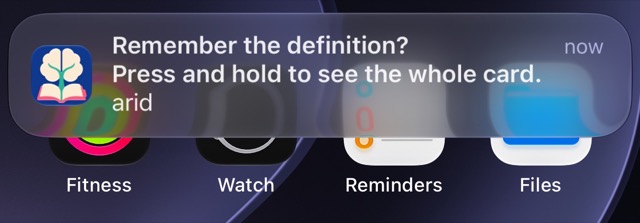
Notifications depend on your iPhone's permissions and settings.
Miss one? It falls due again within half an hour, and that answer earns the same XP as a right one.

You can also practice inside the app, without waiting for a notification.

The dictionary lives on the phone and works offline. It holds 85,000 English words with pronunciations, examples and related words, and learning needs no account.
Now what Miji will not do. It schedules English words only, and it needs an iPhone on iOS 26 or later. It will not take over a deck you already study, and there is nothing to sync.
Miji is free to download. The free version starts with room for 10 words. Search, practice and notifications stay free. Pro lifts the cap on how many words you keep.
Questions
What is the best spaced repetition app?
The flashcards come from different places, so match the app to yours. Anki's iPhone app suits a deck you already keep on a computer. Miji suits the English words your day throws at you. RemNote suits flashcards you write while taking notes.
What is the best free spaced repetition app for iPhone?
Every App Store app on this page is free to download, except Anki's iPhone app. Miji's free version keeps dictionary search and practice, with room for 10 words. Judge the free ones by where their flashcards come from, and by whether the review reaches you.
Which iPhone apps use FSRS?
Anki's iPhone app and Miji both schedule with FSRS, and RemNote's site offers it as well. What FSRS buys you is a date read from your own history. The same word can fall due tomorrow for you and next month for a friend.
Is a spaced repetition app better than paper flashcards?
Past a few dozen flashcards, yes. A paper Leitner box works, but you sort every flashcard by hand. An app counts the days for you.
Which spaced repetition app should I start with in 2026?
Start with the one that needs the least setup from you. If you are already reading English and looking words up, that is where your flashcards are hiding.