

The Best Anki Alternatives for iPhone
The best Anki alternative for iPhone depends on who makes your flashcards. Try Noji for ready-made decks, and RemNote or Mochi for notes. For English words you look up, Miji is the simplest: tap Remember, and the flashcards make themselves. For exams, try Quizlet or Brainscape.
This article is published by Miji’s maker.
Why look for an Anki alternative?
Anki is a strong flashcard program. On a computer, it is free and open source. On iPhone, Anki is a paid app, and its sales help pay for Anki's development.
The iPhone app is not made to stand alone, either. Its App Store page calls it a companion to Anki on a computer. It asks you to start with the computer version before you buy it.
Price is not the biggest cost, though. Time is. In Anki, you type the front and the back of each flashcard. Ten new words this week? That is ten flashcards to type.
Anki's manual calls a shared deck the easiest way to get started. But a shared deck holds the words someone else picked, not the words you meet.
What to look for in an Anki alternative
Three questions sort every flashcard app. Ask them before you download anything.
- Does it use spaced repetition? Spaced repetition brings a flashcard back just before you would forget it. That timing is what makes a word stick. Here is how spaced repetition works.
- Who makes the flashcards? In Anki, you add them yourself or download someone else's deck. Noji and Brainscape also offer ready-made flashcards. Mochi and RemNote turn your notes into flashcards. In Miji, the dictionary makes them for you. Quizlet can make them from a recorded lecture.
- How does practice reach you? Quizlet can turn your notes into audio for your commute. In Miji, the flashcard arrives as a notification. Anki can remind you to study each day and say how many reviews are waiting.
Apps like Anki for iOS, by what they are built for
Every app below uses spaced repetition. They differ in where the flashcards come from.
Noji
Noji is built for studying decks, your own or ready-made ones. You can create flashcards and change how they look. Or you can pick a deck from its large library. Its users include students, teachers and language learners, and it has a web version too.
Mochi
Mochi is for people who write notes. You type notes and flashcards in markdown, a simple text format. One click turns a note into flashcards. You can also link notes and flashcards to each other.
RemNote
RemNote is a notes app for long-term knowledge. You make flashcards straight from your notes, and from PDFs you highlight. It also holds outlines, tags and to-do lists.
Quizlet
Quizlet is built for students with a test coming up. You type, paste or upload your notes, and Quizlet builds a study set. It adds practice tests, a puzzle game and spaced repetition.
Miji
Miji is built for learning the English words you look up. It is a dictionary first. Tap Remember on a meaning, and Miji makes the flashcards. You answer each word from your lock screen.
Brainscape
Brainscape is built for serious study, from languages to exams. After each flashcard, you rate how sure you felt. You can study flashcards made by experts or by other people. You can also make your own from notes.
AnkiMobile, Anki's own iPhone app
Anki's iPhone app can keep your flashcards in sync with Anki on your other devices. It uses the same scheduling as the computer version. It also shows graphs and statistics about your study.
| App | Price to download | Rating | Last update | Needs |
|---|---|---|---|---|
| AnkiMobile Flashcards | $24.99 | 4.0 from 2,300+ ratings | September 8, 2025 | iOS 15.2 or later |
| Noji - Flashcards study app | Free | 4.6 from 13,000+ ratings | September 24, 2026 | iOS 16.4 or later |
| Mochi - Flashcards and notes | Free | 4.6 from 170+ ratings | September 16, 2026 | iOS 15.6 or later |
| Miji: Dictionary & Flashcards | Free | No ratings yet | October 14, 2026 | iOS 26.0 or later |
| RemNote - Notes & Flashcards | Free | 4.8 from 1,600+ ratings | October 15, 2026 | iOS 16.5 or later |
| Quizlet: More than Flashcards | Free | 4.8 from 1,100,000+ ratings | October 13, 2026 | iOS 17 or later |
| Brainscape - Study Flashcards | Free | 4.8 from 21,000+ ratings | October 5, 2026 | iOS 16.6 or later |
Miji: the simplest Anki alternative for English words
Looked up a word, then forgot it five minutes later? Normal. Miji is made for exactly that word.
Miji is a dictionary that remembers for you. You never type a front or a back.

That tap on Remember makes two flashcards. One asks what the word means. The other asks for the word from its meaning.
The dictionary is built in and works offline. It has 85,000 English words, with pronunciations, examples and synonyms. Type a word or paste it. With Pro, share it to Miji from any app.
The flashcard comes to you
Miji brings your flashcards back as notifications. The notification is the flashcard. Tap Knew or Forgot on your lock screen, and you are done. There is no app to open and no session to sit down for. Want the whole flashcard first? Press and hold the notification.
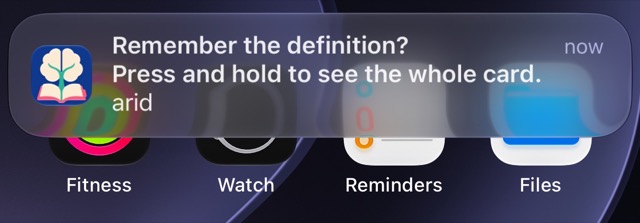
Notifications depend on your iPhone's permissions and settings.
The same science as Anki
Miji uses FSRS, a scheduling algorithm Anki uses too. Miji uses your answers to choose when each word comes back. Forgetting is part of learning. Miji never punishes it.
What Miji does not do
Miji is for English words only, on iPhone with iOS 26 or later. It has no shared decks and no sync. For other subjects, choose one of the apps above.
Your Anki decks can stay where they are. Start Miji with the next word you look up. No account is needed to learn.
What Miji costs
Miji is free to download. The free version starts with room for 10 words. Reaching the limit never stops you studying or exporting the words you already have. Dictionary search, pronunciation, practice, notifications and export stay free. Pro adds unlimited word capacity, unlimited decks and saving from any app.
Questions
Is there a free Anki alternative for iPhone?
Yes. Noji, Mochi, Miji, RemNote, Quizlet and Brainscape are all free to download. Miji's free version keeps dictionary search and practice, with room for 10 words.
What is a simpler alternative to Anki?
For English words, try Miji. You look a word up, tap Remember, and Miji writes two flashcards for you. Later, you answer them without opening the app.
What is the best AnkiMobile alternative?
For English words, Miji: it makes the flashcards straight from its dictionary, so there is nothing to type. Noji is closest if what you want is decks, and it has a ready-made library. In RemNote, flashcards come out of your notes.
Do any apps like Anki for iOS use the same algorithm?
Yes. Anki's iPhone app can use FSRS, and Miji uses it for every word. RemNote also lets you switch to FSRS in its settings.